Execute Generated ROS Launch File
Now that you have generated a ROS package (containing a number of custom .launch files) from your system model, you can test it out on your Linux machine.
Note
There are different methods (.ssh, shared drive, etc.) to conveniently link your Windows machine (running the TASCK Toolchain) and your Linux machine (simulation environment).
Prerequisites
- Ubuntu 16.04 machine with
ros-kinetic-desktop-fullinstalled and properly configured. - talker_and_listener ROS package previously generated from model.
Set Up catkin_ws
- Open a terminal and execute the following commands
$ mkdir -p ~/catkin_ws/src
$ cd ~/catkin_ws/
$ catkin_make
- Download the
openmeta_ros_beginner_tutorialsROS package. It contains thetalker.pyandlistener.pynodes.
$ cd src/
$ git clone git@github.com:metamorph-inc/openmeta-ros-beginner-tutorials.git
Add Generated talker_and_listener ROS Package
- Copy the previously generated talker_and_listener ROS package into
~/catkin_ws/src. - Build the
`catkin_ws.
$ cd ~/catkin_ws/
$ catkin_make
Run Generated ROS Launch File
$ . ~/catkin_ws/devel/setup.bash
$ roslaunch talker_and_listener robot.launch
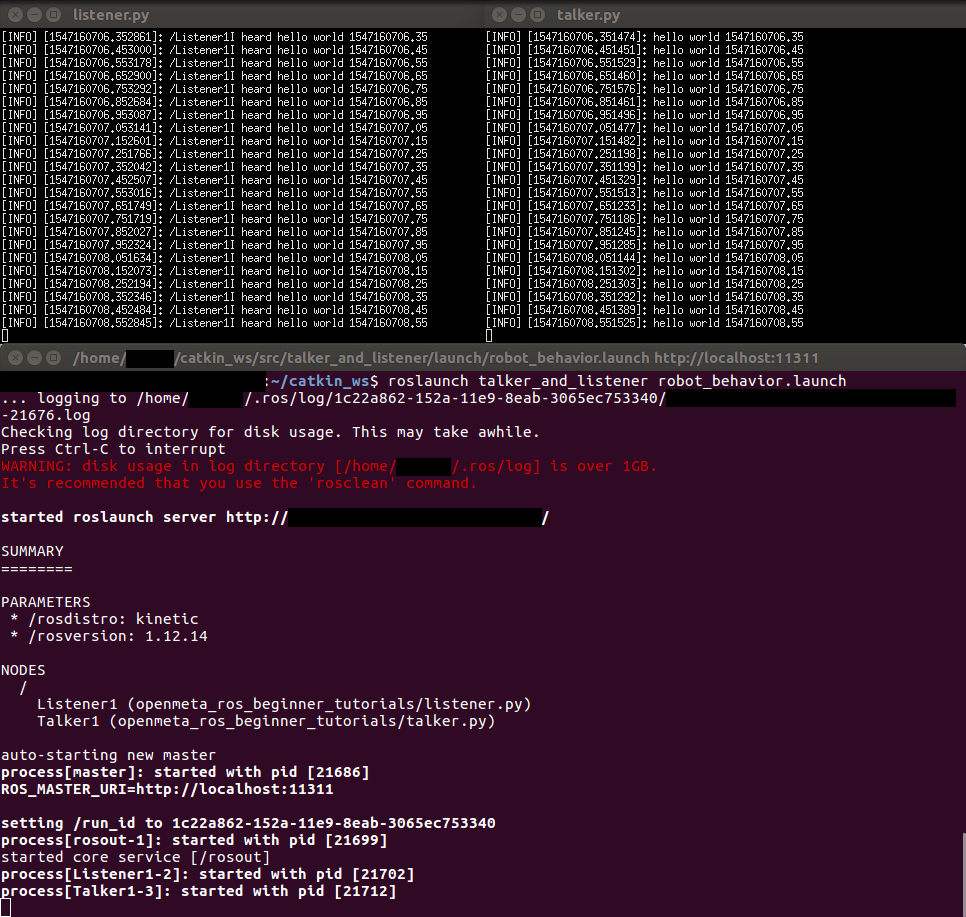
Congratulations! You have completed the ROS Simple Publisher and Subscriber Tutorial.